neomia Pulse Dashboard
Introduction
neomia Pulse is a behavioral analysis platform used to secure your IT resources.
It is organized in such way that it computes an authentication score based on high level indicators, which in turn are aggregated and computed based on various signals.
Signals → Indicators → Authentication Score
neomia Pulse Dashboard allows the administrator to visualize these signals and decide, through fine-grained authentication policies, how indicators are used into the computation of the final Authentication Score.
Access
neomia Pulse Dashboard
https://pulse-dashboard.neomia.ai
Use the username and password provided at the time of your account creation.
Roles
Access to the dashboard is role-based. Each dashboard account has a role per organization (the same account can have different roles on different organizations):
| Role | Capabilities |
|---|---|
| Analyst | View-only access to all pages. |
| Admin | Analyst rights, plus: edit configuration (policies, typing words, MFA clients, alerts, exports), reveal the organization API key, and access raw forensics data. |
| Owner | Admin rights, plus: manage the team (add/remove members, change roles) and subscription-related settings. |
The Owner role cannot be assigned from the UI — it is granted only to the account that links the organization through its API key (see Management → API Keys). An organization always keeps at least one owner.
The Dashboard Application
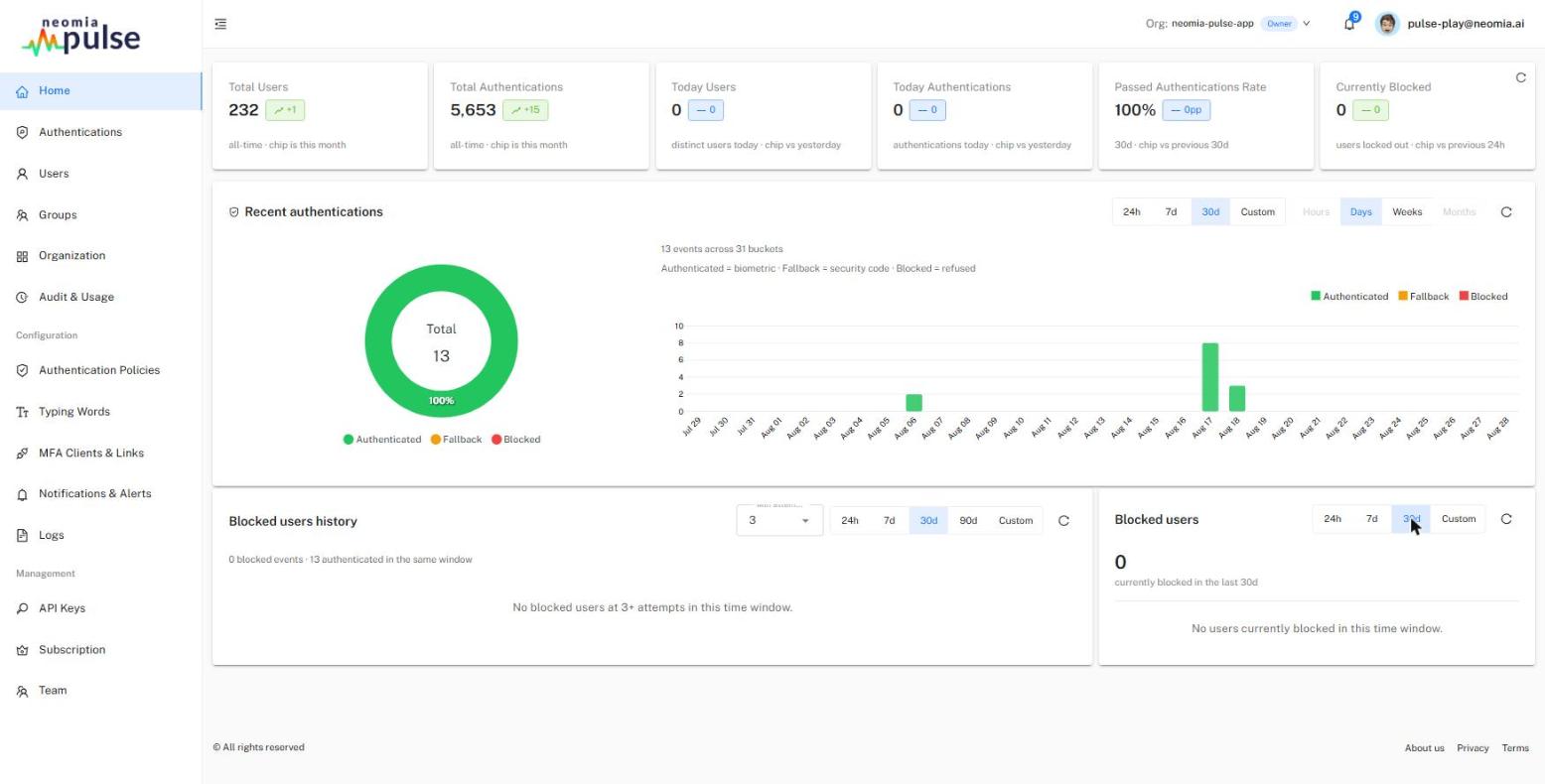
The neomia Pulse Dashboard application allows the administrator to get insights on the neomia Pulse MFA usage, define authentication policies, monitor alerts, and manage users, accounts and their typing profiles.
The navigation sidebar is organized in three groups:
Monitoring & insights — see Insights:
- Home — the current security posture of the organization: key figures, recent authentications, blocked users.
- Authentications — the authentication timeline with per-authentication details, indicators, signals and forensics.
- Users — user and account management: enrollment status, biometric profiles, security codes, members of shared accounts, bulk actions.
- Groups — groups inferred from the authentication tags sent by your integration, and the policy applied to each.
- Organization — organization-wide statistics: authentication history, top users, connection patterns, geolocation, signals.
- Audit & Usage — historical activity from the audit log, retained independently of user deletion.
Configuration — see Configuration:
- Authentication Policies — define how Pulse weighs biometric and contextual indicators and what outcome each score range produces.
- Typing Words — manage the word lists proposed by the sign-in widget and the widget display language.
- MFA Clients & Links — register OIDC and Microsoft Entra (EAM) relying parties and generate enrollment links.
- Notifications & Alerts — choose which events raise alerts and how they are delivered (notification, email, SMS, syslog).
- Logs — export events, requests, authentications and user datasets as CSV archives.
Management — see Management:
- API Keys — the organizations linked to your dashboard account and their API keys.
- Subscription — license details, account quotas and usage graphs.
- Team — dashboard members of the organization and their roles (owners only).
The top bar provides an organization switcher (for accounts linked to several organizations), the notifications bell and the profile menu.
Complementary documentation
A complementary documentation (in french) on The Pulse Dashboard can be found at the following address: https://neomia.ai/pulse-dashboard.