Skip to content

CAS logo

Central Authentication Service (CAS) Integration

Foreword

The neomia « Pulse CAS Plugin » allows to reinforce the authentication of a user by adding a biometric factor in addition to the factor used by default in the service Single Sign-On CAS. This page is intended for administrators of the CAS Single Sign-On service and presents the technical steps required to integrate biometric authentication into the CAS authentication service. Only the elements related to the integration of this functionality are described in this page. For a detailed description of the Signle Sign-On CAS service and its installation, it is recommended to consult the official Apereo CAS documentation.

Compatibility / Requirements

Integrate neomia Pulse in your CAS

Add Pulse plugin in CAS dependencies (./build.gradle) :

1
2
3
4
5
6
7
8
dependencies {
    implementation "org.apereo.cas:cas-server-support-rest"
    implementation "org.apereo.cas:cas-server-support-ldap"
    implementation "org.apereo.cas:cas-server-support-json-service-registry"
    implementation "org.apereo.cas:cas-server-support-throttle-bucket4j"

    implementation files("./neomia-pulse-plugin-cas-0.2.2-SNAPSHOT.jar")
}

Build a new CAS to generate the cas.war file. And then deploy the new archetype in your web server.

You can download your CAS plugin here.

Configuration files

Usually configurations files are saved in /etc/cas/config/ directory.

CAS Configuration (cas.properties)

Mail server

1
2
3
4
5
6
7
8
spring.mail.host=smtp.gmail.com
spring.mail.username=neomia.pulse@gmail.com
spring.mail.password=mypassword
spring.mail.port=25
spring.mail.protocol=smtp
spring.mail.testConnection=true
spring.mail.properties.mail.smtp.auth=true
spring.mail.properties.mail.smtp.starttls.enable=true

Configure your attributes

 1
 2
 3
 4
 5
 6
 7
 8
 9
10
11
12
cas.authn.attribute-repository.ldap[0].id=1
cas.authn.attribute-repository.ldap[0].order=0
cas.authn.attribute-repository.ldap[0].ldap-url=ldap://openldap:389
cas.authn.attribute-repository.ldap[0].search-filter=mail={user}
cas.authn.attribute-repository.ldap[0].base-dn=ou=people,dc=example,dc=org
cas.authn.attribute-repository.ldap[0].subtree-search=true
cas.authn.attribute-repository.ldap[0].bind-dn=cn=admin,dc=example,dc=org
cas.authn.attribute-repository.ldap[0].bind-credential=password
cas.authn.attribute-repository.ldap[0].attributes.supannMailPerso=supannMailPerso
cas.authn.attribute-repository.ldap[0].attributes.mail=mail
cas.authn.attribute-repository.ldap[0].attributes.sn=sn
cas.authn.attribute-repository.ldap[0].attributes.uid=uid

Configure token registery

1
2
# https://apereo.github.io/cas/6.6.x/authentication/Configuring-Authentication-Throttling.html
cas.authn.throttle.bucket4j.bandwidth[0].capacity=120

Add neomia Pulse as MFA

1
cas.authn.mfa.triggers.global.global-provider-id=mfa-pulse

Pulse Plugin Configuration (pulsecas.properties)

Create file /etc/cas/config/pulsecas.properties and put the following configuration after completing it :

 1
 2
 3
 4
 5
 6
 7
 8
 9
10
11
12
13
pulsecas.activated=true

pulsecas.tokenOnly=false

pulsecas.apiUrl=https://api.neomia.ai/pulse
pulsecas.apiKey=<YOUR API Key HERE>
pulsecas.tokenMailFrom=dev@neomia.ai

pulsecas.attributeUserReference=uid
pulsecas.attributePrivateMail=supannMailPerso
pulsecas.attributeMfaMode=mfaMode

pulsecas.redirectUri=https://cas.example.org/cas/login

Properties (neomia Pulse Plugin)

Property name Description Required
activated If false, the Plugin is disabled (no behavioral analysis or token). (true or false default true) No
tokenOnly If false, behavioral analysis is used, otherwise, only the MFA token is used. (true or false default true) No
apiUrl neomia Pulse API URL (default https://api.neomia.ai/pulse). Yes
apiKey Your neomia Pulse API key. Yes
attributeUserReference Name of the attribute used for the neomia Pulse identifier. Yes
attributePrivateMail Name of the attribute containing the destination email address for the token. Yes
attributeMfaMode Name of the attribute for MFA usage custom mode (token, pulse, off). No
tokenMailFrom Email address used to send OTP. Yes
redirectUri Your CAS extenal URL, used for the redirect from neomia Pulse service. No
How to disable the behavioral analysis ?

Comment or remove the line : pulsecas.tokenOnly=false in pulsecas.properties configuration file. And then, restart your CAS server.

How to disable Pulse plugin ?

Comment or remove the line : pulsecas.activated=true in pulsecas.properties configuration file. And then, restart your CAS server.

Configuration example with LDAP suppan attributes

 1
 2
 3
 4
 5
 6
 7
 8
 9
10
pulsecas.tokenOnly=false

pulsecas.apiUrl=https://api.neomia.ai/pulse
pulsecas.apiKey=<YOUR API KEY HERE>

pulsecas.attributeUserReference=uid
pulsecas.attributePrivateMail=supannMailPerso

pulsecas.tokenMailFrom=dev@neomia.ai
pulsecas.redirectUri=https://cas.example.org/cas/login

After editing the configuration, please restart your CAS server.

Services configuration files (special config cases)

When applying neomia Pulse MFA factor to CAS there are two possibilities:

  1. Apply neomia Pulse MFA factor to all configured services

  2. Apply neomia Pulse MFA factor only to specific services

If you want to partially apply neomia Pulse MFA plugin to some of the services, you can either:

  • (1) enable global trigger and then add bypass to services and application that can skip the MFA; or

  • (2) enable neomia Pulse MFA on specific services.

(1) Global trigger

https://apereo.github.io/cas/6.6.x/mfa/Configuring-Multifactor-Authentication-Triggers-Global.html

1
cas.authn.mfa.triggers.global.global-provider-id=mfa-pulse

Bypass per application

https://apereo.github.io/cas/6.6.x/mfa/Configuring-Multifactor-Authentication-Triggers-PerApplication.html

The bypass can be activated per Service

 1
 2
 3
 4
 5
 6
 7
 8
 9
10
{
  "@class" : "org.apereo.cas.services.CasRegisteredService",
  "serviceId" : "^(https|imaps)://.*",
  "id" : 100,
  "multifactorPolicy" : {
    "@class" : "org.apereo.cas.services.DefaultRegisteredServiceMultifactorPolicy",
    "multifactorAuthenticationProviders" : [ "java.util.LinkedHashSet", [ "mfa-pulse" ] ],
    "bypassEnabled" : "true"
  }
}
Bypass per Principal Attribute & Service

 1
 2
 3
 4
 5
 6
 7
 8
 9
10
{
  "@class" : "org.apereo.cas.services.CasRegisteredService",
  "serviceId" : "^(https|imaps)://.*",
  "id" : 100,
  "multifactorPolicy" : {
    "@class" : "org.apereo.cas.services.DefaultRegisteredServiceMultifactorPolicy",
    "bypassPrincipalAttributeName": "attributeForBypass",
    "bypassPrincipalAttributeValue": "^bypass-value-[A-Z].+",
  }
}

(2) Enable only on specific services

 1
 2
 3
 4
 5
 6
 7
 8
 9
10
11
12
13
14
15
16
{
  "@class" : "org.apereo.cas.services.CasRegisteredService",
  "serviceId":"^(https|http|imaps)://localhost:3001/.*",
  "name" : "rocketchat1",
  "id" : 2,
  "evaluationOrder" : 10,
  "multifactorPolicy" : {
    "@class" : "org.apereo.cas.services.DefaultRegisteredServiceMultifactorPolicy",
    "multifactorAuthenticationProviders" : [ "java.util.LinkedHashSet", [ "mfa-pulse"] ],
    "principalAttributeNameTrigger" : "description",
    "principalAttributeValueToMatch" : "pulse|token",
    "bypassEnabled" : "false",
    "forceExecution": "false",
    "failureMode" : "CLOSED"
  }
}

Bypass, force execution and failure modes

bypassEnabled => can this service skip the MFA factor

forceExecution => force MFA factor every time

failureMode=> What is going to happen if MFA factor fails

https://apereo.github.io/cas/6.6.x/mfa/Configuring-Multifactor-Authentication-Bypass.html

https://apereo.github.io/cas/6.6.x/mfa/Configuring-Multifactor-Authentication-FailureModes.html

Starting

 1
 2
 3
 4
 5
 6
 7
 8
 9
10
11
12
13
14
15
16
17
18
19
20
21
22
23
24
25
26
27
28
29
30
cas-1           |                             _         ______      _
cas-1           |                            (_)        | ___ \    | |
cas-1           |  _ __   ___  ___  _ __ ___  _  __ _   | |_/ /   _| |___  ___
cas-1           | | '_ \ / _ \/ _ \| '_ ` _ \| |/ _` |  |  __/ | | | / __|/ _ \
cas-1           | | | | |  __/ (_) | | | | | | | (_| |  | |  | |_| | \__ \  __/
cas-1           | |_| |_|\___|\___/|_| |_| |_|_|\__,_|  \_|   \__,_|_|___/\___|
cas-1           |
cas-1           |
cas-1           |  _____   ___   _____          _             _
cas-1           | /  __ \ / _ \ /  ___|        | |           (_)
cas-1           | | /  \// /_\ \\ `--.    _ __ | |_   _  __ _ _ _ __
cas-1           | | |    |  _  | `--. \  | '_ \| | | | |/ _` | | '_ \
cas-1           | | \__/\| | | |/\__/ /  | |_) | | |_| | (_| | | | | |
cas-1           |  \____/\_| |_/\____/   | .__/|_|\__,_|\__, |_|_| |_|
cas-1           |                        | |             __/ |
cas-1           |                        |_|            |___/
cas-1           |
cas-1           |
cas-1           | -----------------------------------------------------------------------------------------
cas-1           | Pulse activated: true
cas-1           | Pulse Mode: (behavioral analytics)
cas-1           | Pulse API URL: https://api.neomia.ai/pulse
cas-1           | Pulse API key: krcVZwJCJe...
cas-1           | Attribute Pulse user reference: uid
cas-1           | Attribute Private mail: supannMailPerso
cas-1           | Attribute MFA mode (pulse|token|off): mfaMode
cas-1           | Token Mail from: wordpress.neomia.pulse@gmail.com
cas-1           | Redirect URI: https://cas.example.org/cas/login
cas-1           | -----------------------------------------------------------------------------------------
cas-1           | neomia Pulse CAS 0.2.1 for CAS 6.6.15 Started

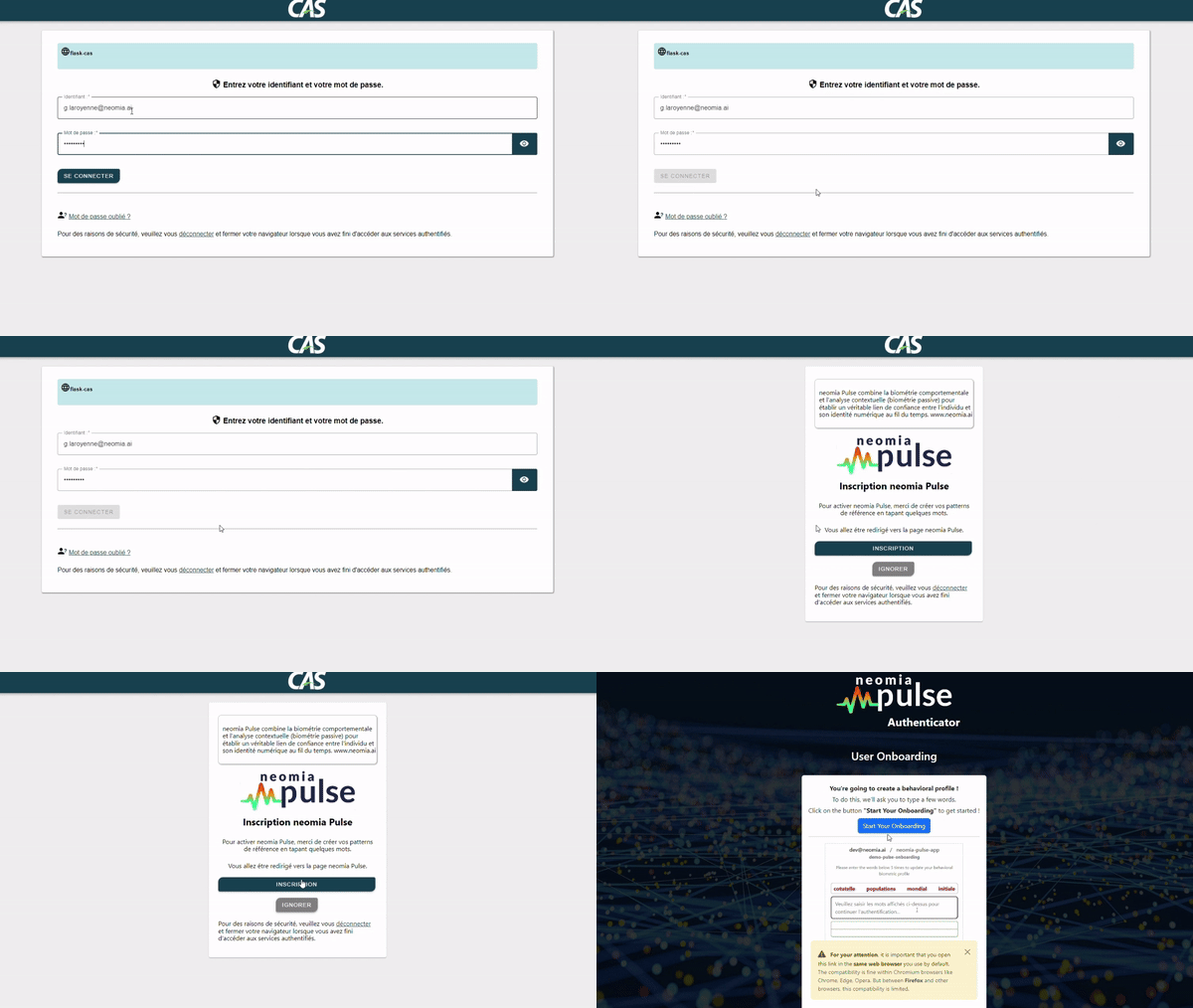
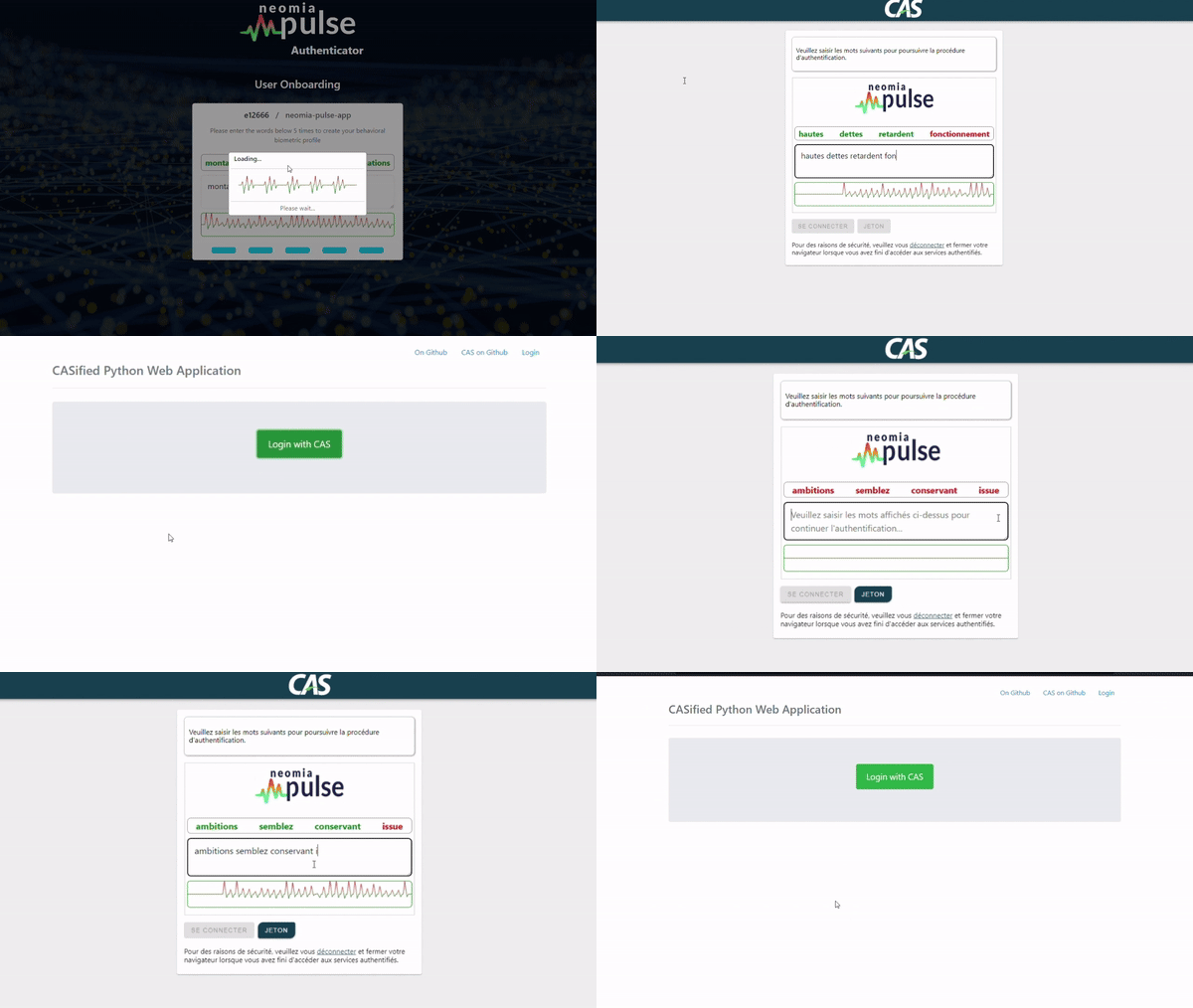
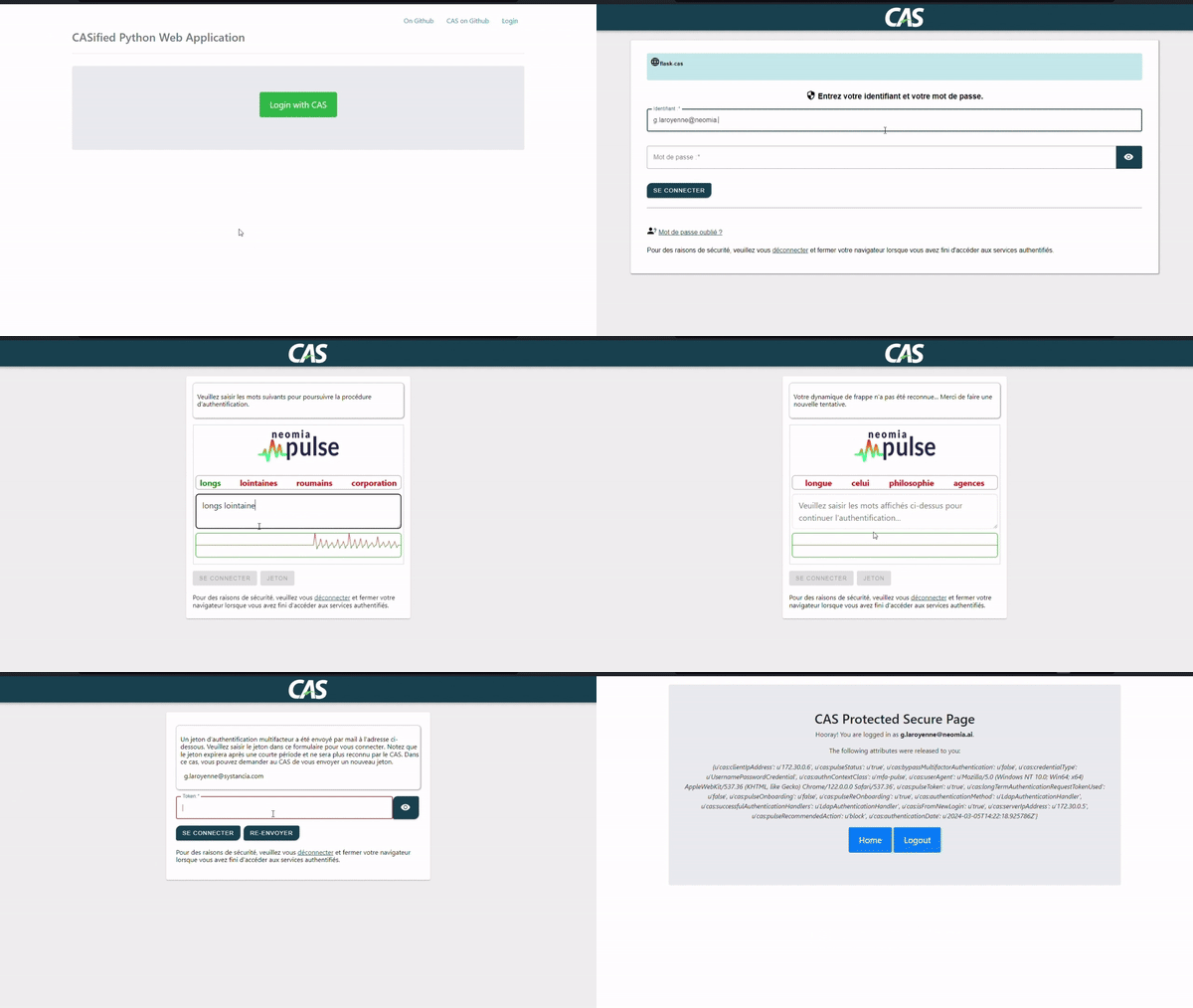
Demonstration

Onboarding

Onboarding

Onboarding

Behavioural analysis

User verify

Token MFA

Token MFA

Working details

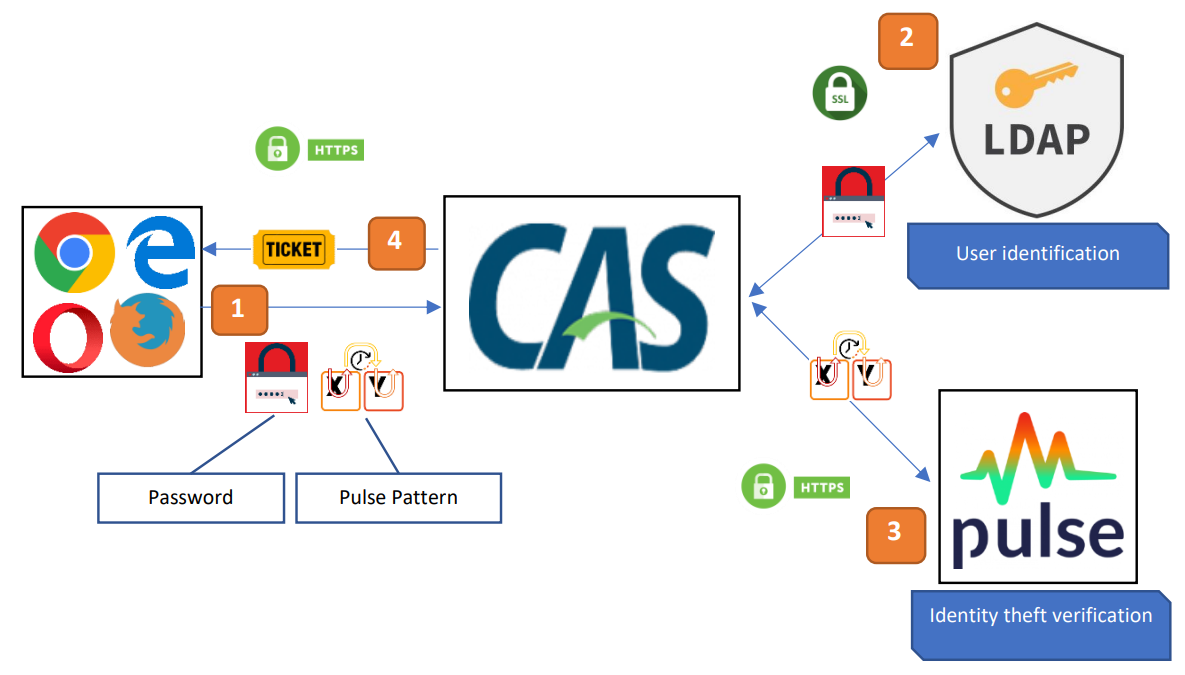
Authentication process

CAS process

Step Description
1 The user enters the login details on the CAS login form.
2 The user is authenticated by LDAP.
3 The identity of the user is confirmed by neomia Pulse.
4 The user receives a ticket allowing him to access his applications.

Pulse CAS Handler

Pulse plugin add a new handler MFA in CAS server.
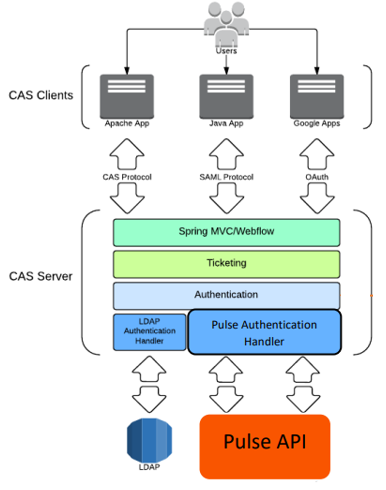
CAS Handler

Pulse CAS Policy

Pulse plugin uses a short circuit authentication policy. If LDAP handler faileds, the authentication is automatically failed and Pulse has no effect.
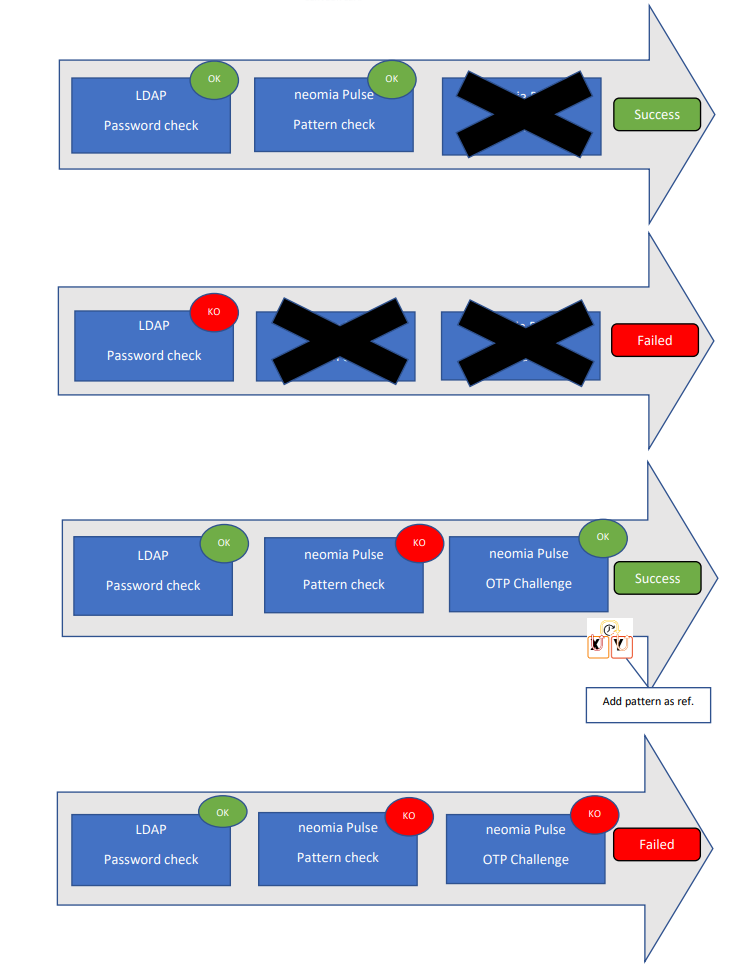
CAS Policy